Unix timestamps: seconds vs milliseconds
Recognize the unit, convert through UTC, and avoid timezone mistakes.
Recognize the unit, convert through UTC, and avoid timezone mistakes.
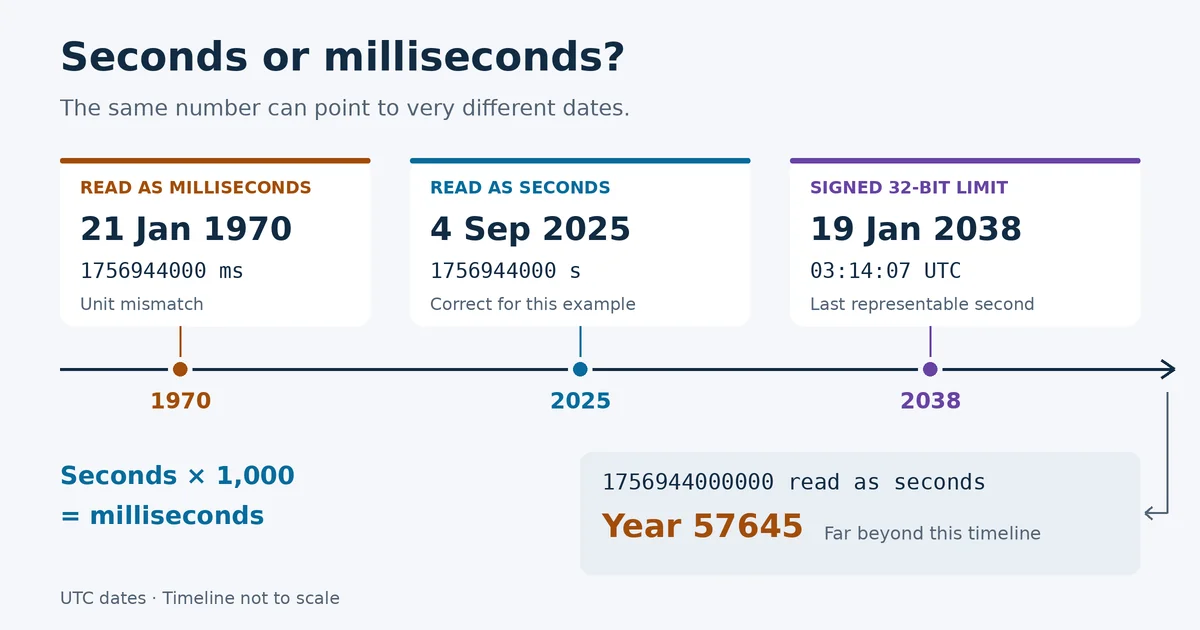
A log line shows 1756944000. An API returns 1756944000000. Both can represent midnight UTC on 4 September 2025. Read either in the wrong unit and you can land in January 1970 or the year 57645.
Short version. Unix timestamps count from 1970-01-01 00:00:00 UTC. Check the unit: seconds × 1,000 gives milliseconds; milliseconds ÷ 1,000 gives seconds. Ten versus thirteen digits is a useful clue for present-day values, not a reliable format check.
Unix time counts seconds from 1970-01-01 00:00:00 UTC, called the epoch. Millisecond timestamps use the same starting point with a smaller unit. Unix time does not count leap seconds.
The number carries no timezone or calendar formatting. Two servers on opposite sides of the world agree on the instant when they agree on the epoch and unit. The number alone isn't enough.
Try the sample values at the Timestamp Converter, selecting the matching input unit.
When you expected a recent date, a unit mismatch is a good first check:
1756944000 interpreted as milliseconds becomes 21 January 1970 at 08:02:24 UTC.Set the reader to the source unit. If it accepts only milliseconds, multiply a seconds value by 1,000. If it accepts only seconds, divide a milliseconds value by 1,000.
A value of 0 means the epoch itself: midnight on 1 January 1970 in UTC. Local time may show 31 December 1969. An unexpected zero can be a missing value converted to zero or a default; check the source before treating it as a real date.
Check the API or field definition. Python's time.time() returns seconds, including a fractional part. The shell command date +%s prints whole seconds. JavaScript's Date.now() returns milliseconds, and new Date(number) expects milliseconds. Other APIs may use microseconds or nanoseconds.
For example, pass the seconds sample to JavaScript like this:
new Date(1756944000 * 1000).toISOString();
// "2025-09-04T00:00:00.000Z"
Ten digits for seconds and thirteen for milliseconds is a quick check for present-day positive integer values. Older dates, negative values and fractional seconds don't follow that pattern. Set the unit explicitly whenever you know it. If you don't know the unit, try both and compare the results with the expected date range. Confirm the unit before using the value.
Dividing milliseconds by 1,000 can produce fractional seconds. Keep that fraction unless the receiving system requires whole seconds, then follow its rounding rule.
If the same timestamp displays different clock times, check the display timezone. The instant hasn't changed.
For example, 2025-09-04T00:00:00Z and 2025-09-04T08:00:00+08:00 describe the same instant. Z means UTC; +08:00 means eight hours ahead of UTC. A date-time string without an offset needs an agreed timezone to identify an instant.
For logs and recorded events, store a Unix timestamp with a documented unit or a UTC date-time. Convert for display. Calendar schedules may also need a named timezone so future daylight-saving changes are handled correctly.
A signed 32-bit integer storing Unix seconds reaches its maximum at 2038-01-19 03:14:07 UTC. The next second cannot fit. Software may fail or wrap to a negative value corresponding to 1901.
Using a 64-bit timestamp avoids this limit, but running on a 64-bit computer does not guarantee every database field, library or file format uses one.
This matters to new applications too, especially when storing future dates or exchanging data with older systems. Check the timestamp type throughout the path, not just the operating system.
| Seconds | Milliseconds | |
|---|---|---|
| Digits (present-day positive integers) | 10 | 13 |
| Example source | Shell date +%s |
JavaScript Date.now() |
| Convert to the other unit | × 1,000 | ÷ 1,000 |
| If read as the other unit | Date near 1970 | Far-future date or range error |
Convert a value at the Timestamp Converter. It accepts whole-number input; use milliseconds when you need millisecond precision.